
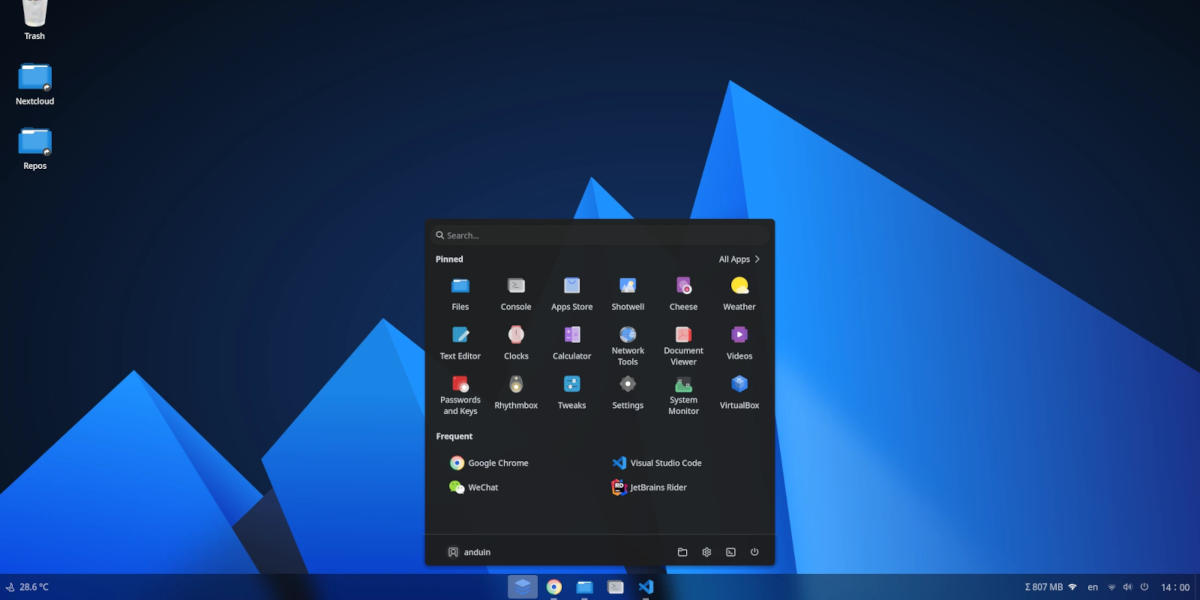
Switching to Linux Without Losing the Familiar Feel
If you’ve been using Windows for years and you’re starting to feel it’s time for a system that’s safer, faster, and a lot less frustrating, the idea of moving to Linux can sound intimidating at first. Leaving a familiar environment isn’t easy, especially when you expect everything to look and behave differently.
That’s exactly where AnduinOS steps in. It gives you the comfort of a Windows-like experience while opening the door to the power and flexibility of Linux.
AnduinOS is built on Ubuntu, which means you’re getting a solid, well-supported foundation with access to a massive library of Linux apps and tools. What makes it stand out is how familiar it feels from the moment you start using it. The layout resembles Windows, the taskbar sits right where you expect it, icons and menus are neatly structured, and the whole environment feels natural without needing to relearn every little thing.
Why AnduinOS Might Be Exactly What You Need
Smooth visual transition: One of the biggest concerns for anyone coming from Windows is feeling lost in a new system. AnduinOS minimizes that shock. The interface looks familiar, the navigation feels straightforward, and you won’t find yourself spending hours trying to figure out where things are.
Better performance, even on older machines: If your current Windows installation feels sluggish, AnduinOS can breathe new life into your device. You’ll notice faster boot times, smoother performance, and more responsiveness overall, all while keeping a layout that still feels like home.
The flexibility of Linux with the comfort of something you know: You get access to the full power of Linux, from a rich ecosystem of software to strong security and system stability. And since the system is built on Ubuntu, you also benefit from its large community support, troubleshooting resources, and compatibility with most Linux applications.
A Few Things You Should Know
AnduinOS feels familiar, but it isn’t Windows. Some system behaviors will be different, especially when it comes to file management and certain applications. That’s normal. You’re not switching to a difficult system; you’re simply adjusting to a slightly different way of doing things.
Think of it like getting a new TV. It still shows your channels and works like your old one, but the remote has a few buttons in different places. You’ll get used to it after a short while, and eventually you’ll wonder why you didn’t upgrade sooner.
Why We Recommend It
If your goal is to switch to Linux without feeling like you’ve jumped into completely new territory, AnduinOS hits the sweet spot. It’s clean, intuitive, and pleasant to use from day one. And thanks to its Ubuntu base, you’re getting stability, security, and long-term reliability.
So if you want a fresh experience without the painful learning curve, and you’d like every click to feel familiar. AnduinOS is one of the easiest and most comfortable ways to start your Linux journey. It delivers performance, safety, and modern features without forcing you to abandon the look and feel you’re used to.
Final Thoughts
Switching from Windows to Linux doesn’t have to be stressful or confusing. With AnduinOS, you get a system that feels familiar, works smoothly, and gives you a level of performance and security that many users find refreshing. You’re not losing what you know, you’re gaining something better, more stable, and far more flexible.
Need help?
If you feel ready to make the move and want a smooth, hassle-free transition, we can handle the entire process for you. You don’t have to worry about data migration or system setup.
Just click here to request the service, and we’ll take care of everything from transferring your files to preparing the system so you can start using AnduinOS right away with full confidence.